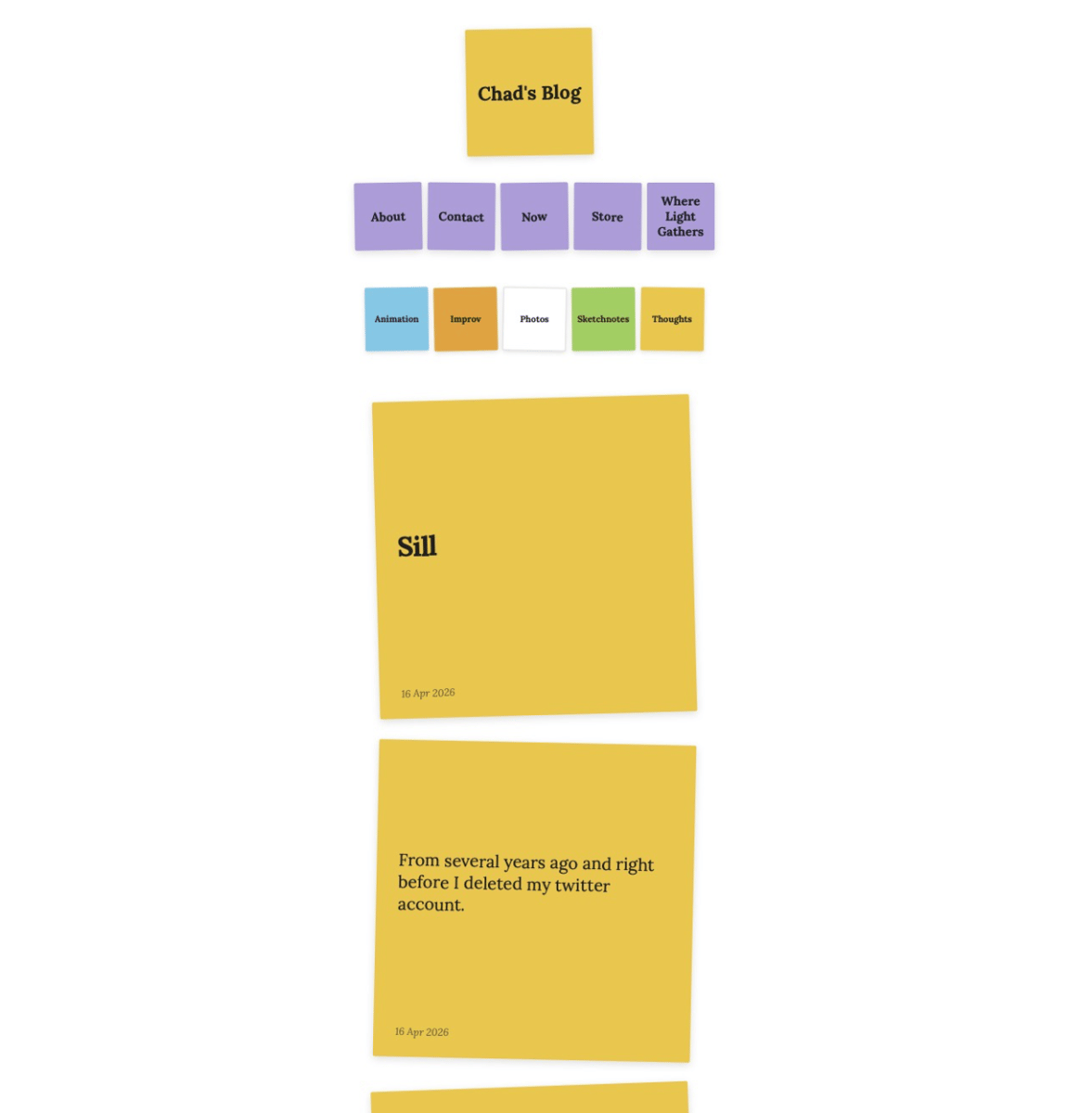
This guide walks through how to create a visual blog design on Pagecord using only CSS and the built-in settings. The result is a blog where posts appear as color-coded square sticky notes, with colors tied to your post tags.
Here is a link to an image that shows the design in action (just in case I change the design before you come across this post - very likely, lol).
What you'll need
You'll need to copy, paste and edit css code. If you're already familiar with css, this should make sense to you. If you are brand new to css, you may want to learn some css basics first.
If you're ready, you'll need:
- A Pagecord blog - It's a great blogging service. Try it!
- A set of tags you plan to use consistently across your posts
Step 1 — Plan your tag system
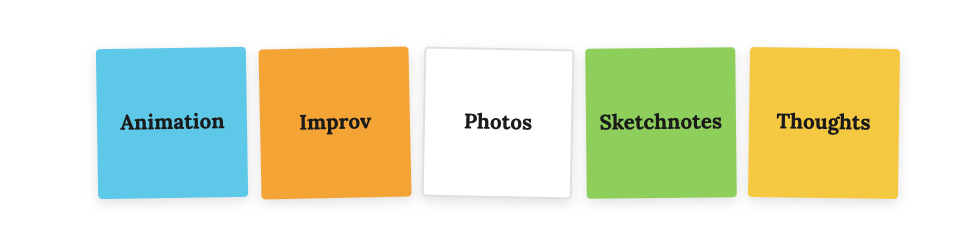
Decide on 4–6 tags you'll use consistently across your posts, and assign a color to each. Keep the tag names short and lowercase. Example:
Tag |
Color |
|---|---|
writing |
Orange |
notes |
Yellow |
photos |
White |
links |
Green |
quotes |
Purple |
These tag names need to match exactly what you enter in Pagecord when tagging posts.
This is what mine looks like:
Step 2 — Set up your nav links
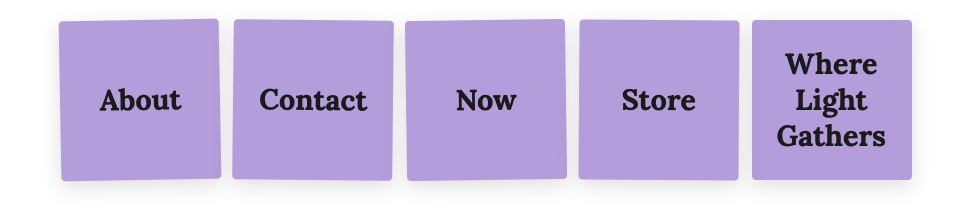
In Pagecord's nav settings, add your page links (About, Now, Contact, etc.). These links will be styled as purple stickie notes on the blog.
Here's mine as an example:
Step 3 — Set up your bio/description field
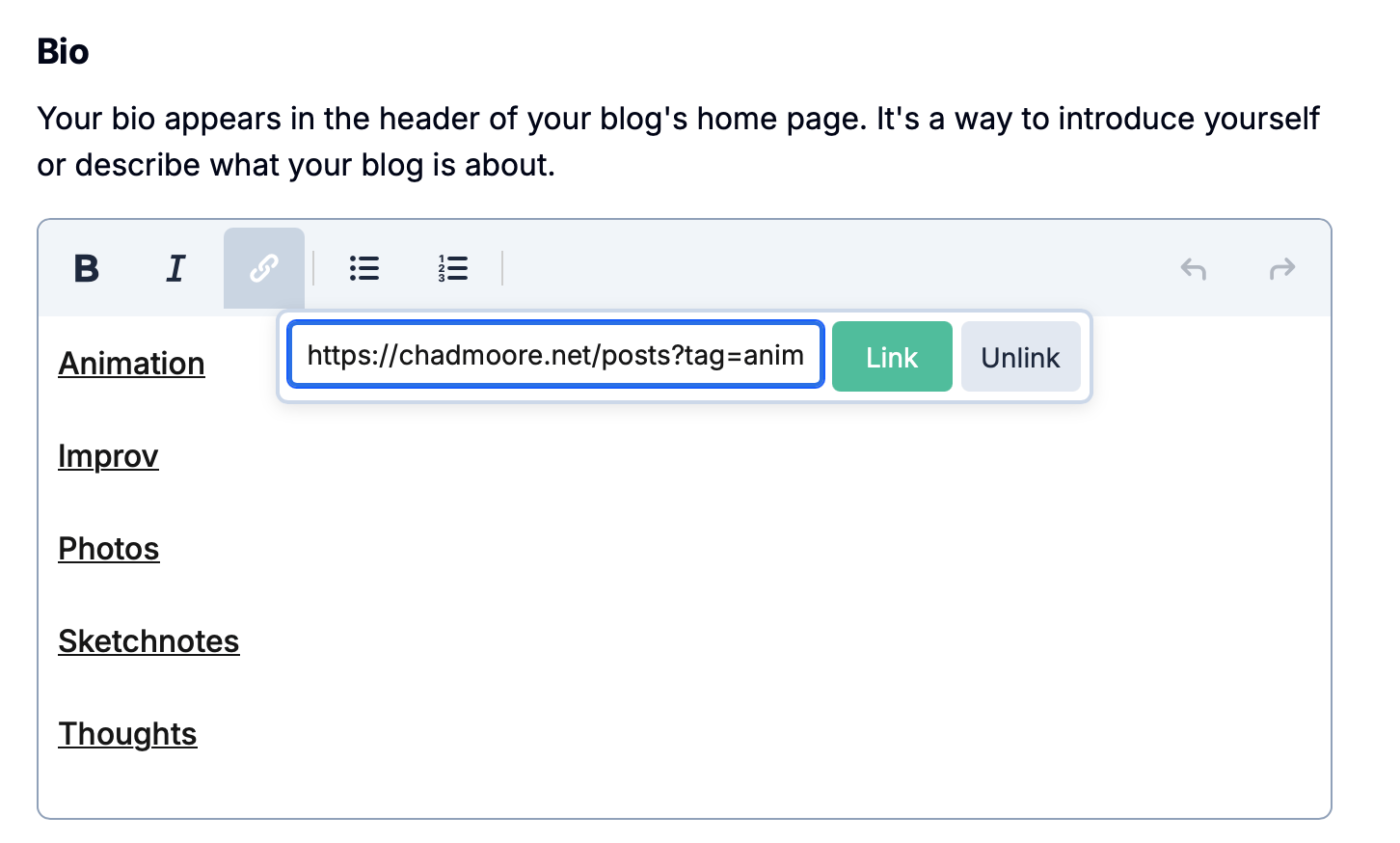
In the Pagecord Settings > About > Bio create hyperlinks in the bio field. One per tag. Type the tag name, select it, and link it to:
https://yourblog.pagecord.com/posts?tag=your-tag-name
Do this for each of your tags. These will become the small color-coded tag stickies below the nav in the header.
Example of my setup
Step 4 — Appearance (Cards Layout and CSS)
In Settings > Appearance > Layout, set to Cards.
Then paste the following into Pagecord's custom CSS field. Replace the tag names and colors with your own:
/* ======================================= */
/* Header layout */
/* ======================================= */
.blog header {
display: flex;
flex-direction: row;
flex-wrap: wrap;
gap: 0.75rem;
align-items: center;
margin-bottom: 2rem;
max-width: 500px;
margin-left: auto;
margin-right: auto;
}
.titlebar {
display: flex;
flex-wrap: nowrap;
gap: 0.75rem;
flex: 1;
min-width: 0;
justify-content: center;
}
.avatar-container {
display: flex;
flex-wrap: nowrap;
gap: 0.75rem;
flex: 1;
min-width: 0;
}
.avatar { display: none; }
/* Blog title sticky */
.blog-title {
flex: 1;
min-width: 0;
aspect-ratio: 1 / 1;
max-width: 150px;
max-height: 150px;
border-radius: 2px;
box-shadow: 0 3px 10px rgba(0,0,0,0.13);
padding: 14px;
margin: 0;
display: flex;
align-items: center;
justify-content: center;
text-align: center;
overflow: hidden;
background: #f5c842;
transform: rotate(-1deg);
font-size: 1.4rem;
font-weight: 700;
color: #1a1a1a;
order: 1;
}
.blog-title a, .blog-title a:visited { color: #1a1a1a; text-decoration: none; }
/* Nav stickies */
nav {
flex-basis: 100%;
order: 4;
background: transparent;
box-shadow: none;
aspect-ratio: unset;
display: flex;
flex-direction: row;
flex-wrap: nowrap;
gap: 0.4rem;
padding: 0;
transform: none;
margin-bottom: 0.5rem;
justify-content: center;
}
nav a {
width: 80px;
aspect-ratio: 1 / 1;
display: flex;
align-items: center;
justify-content: center;
text-align: center;
border-radius: 2px;
font-size: 0.9rem;
font-weight: 700;
color: #1a1a1a;
text-decoration: none;
background: #b39ddb;
box-shadow: 0 3px 10px rgba(0,0,0,0.13);
}
nav a:nth-child(1) { transform: rotate(-1deg); }
nav a:nth-child(2) { transform: rotate(0.6deg); }
nav a:nth-child(3) { transform: rotate(-0.8deg); }
nav a:nth-child(4) { transform: rotate(0.4deg); }
nav a:nth-child(5) { transform: rotate(-0.5deg); }
nav a:hover { text-decoration: underline; }
/* Tag stickies (from bio field) */
.bio {
flex-basis: 100%;
order: 5;
aspect-ratio: unset;
background: transparent;
box-shadow: none;
transform: none;
padding: 0;
display: flex;
flex-direction: row;
flex-wrap: nowrap;
gap: 0.4rem;
justify-content: center;
overflow: visible;
}
.bio p { display: contents; }
.bio p br { display: none; }
.bio a, .bio p a {
width: 75px;
aspect-ratio: 1 / 1;
display: flex;
align-items: center;
justify-content: center;
text-align: center;
border-radius: 2px;
font-size: 0.65rem;
font-weight: 700;
color: #1a1a1a;
text-decoration: none;
box-shadow: 0 2px 6px rgba(0,0,0,0.12);
}
/* Tag sticky colors — match href to your tag names */
.bio a[href*="writing"], .bio p a[href*="writing"] { background: #f4a435; transform: rotate(-1.2deg); }
.bio a[href*="notes"], .bio p a[href*="notes"] { background: #f5c842; transform: rotate(0.8deg); }
.bio a[href*="photos"], .bio p a[href*="photos"] { background: #ffffff; border: 1px solid #e0e0e0; transform: rotate(1.1deg); }
.bio a[href*="links"], .bio p a[href*="links"] { background: #8ecf5a; transform: rotate(-0.6deg); }
.bio a[href*="quotes"], .bio p a[href*="quotes"] { background: #b39ddb; transform: rotate(-0.9deg); }
/* ======================================= */
/* Post stream layout */
/* ======================================= */
.blog-container { max-width: 500px; margin-left: auto; margin-right: auto; }
.post-stream-item { margin-bottom: 1.75rem; }
/* ======================================= */
/* Cards — square post-it style */
/* ======================================= */
.post-card-content {
aspect-ratio: 1 / 1;
width: 75%;
margin-left: auto;
margin-right: auto;
border: none;
border-radius: 2px;
padding: 24px 26px 20px;
box-shadow: 0 3px 10px rgba(0,0,0,0.13);
display: flex;
flex-direction: column;
overflow: hidden;
background: #f5c842;
}
.post-card:hover .post-card-content {
box-shadow: 0 5px 14px rgba(0,0,0,0.16);
transform: none;
}
/* Card colors by tag — replace tag names and colors with your own */
[data-tags~="writing"] .post-card-content { background: #f4a435; }
[data-tags~="notes"] .post-card-content { background: #f5c842; }
[data-tags~="photos"] .post-card-content { background: #ffffff; border: 1px solid #e0e0e0; }
[data-tags~="links"] .post-card-content { background: #8ecf5a; }
[data-tags~="quotes"] .post-card-content { background: #b39ddb; }
/* ======================================= */
/* Rotation — 20 posts before repeating */
/* ======================================= */
.post-card:nth-child(1) { transform: rotate(-1.5deg); }
.post-card:nth-child(2) { transform: rotate(1.2deg); }
.post-card:nth-child(3) { transform: rotate(-2deg); }
.post-card:nth-child(4) { transform: rotate(0.8deg); }
.post-card:nth-child(5) { transform: rotate(-1deg); }
.post-card:nth-child(6) { transform: rotate(1.8deg); }
.post-card:nth-child(7) { transform: rotate(-0.6deg); }
.post-card:nth-child(8) { transform: rotate(1.3deg); }
.post-card:nth-child(9) { transform: rotate(-1.8deg); }
.post-card:nth-child(10) { transform: rotate(0.5deg); }
.post-card:nth-child(11) { transform: rotate(-1.2deg); }
.post-card:nth-child(12) { transform: rotate(1.6deg); }
.post-card:nth-child(13) { transform: rotate(-0.8deg); }
.post-card:nth-child(14) { transform: rotate(2deg); }
.post-card:nth-child(15) { transform: rotate(-1.4deg); }
.post-card:nth-child(16) { transform: rotate(0.9deg); }
.post-card:nth-child(17) { transform: rotate(-1.7deg); }
.post-card:nth-child(18) { transform: rotate(1.1deg); }
.post-card:nth-child(19) { transform: rotate(-2deg); }
.post-card:nth-child(20) { transform: rotate(0.6deg); }
/* ======================================= */
/* Card typography */
/* ======================================= */
.post-card-title {
font-size: 2rem;
font-weight: 700;
color: #1a1a1a;
line-height: 1.2;
margin: auto 0;
}
.post-card-title ~ .post-card-summary { display: none; }
.post-card-summary {
font-size: 1.25rem;
font-weight: 400;
color: #1a1a1a;
line-height: 1.3;
overflow: hidden;
margin: auto 0;
}
.post-card-meta {
margin-top: auto;
flex-shrink: 0;
width: 100%;
display: flex;
justify-content: space-between;
align-items: center;
}
.post-card-date { font-size: 0.75rem; color: #2a2a2a; opacity: 0.65; font-style: italic; }
.post-card-badge { display: none; }
/* ======================================= */
/* Post title colors on individual posts */
/* ======================================= */
.post-title { color: #f5c842; }
[data-tags~="writing"] .post-title { color: #f4a435; }
[data-tags~="notes"] .post-title { color: #f5c842; }
[data-tags~="photos"] .post-title { color: #3c3f39; }
[data-tags~="links"] .post-title { color: #8ecf5a; }
[data-tags~="quotes"] .post-title { color: #b39ddb; }
Step 5 — Tag your posts
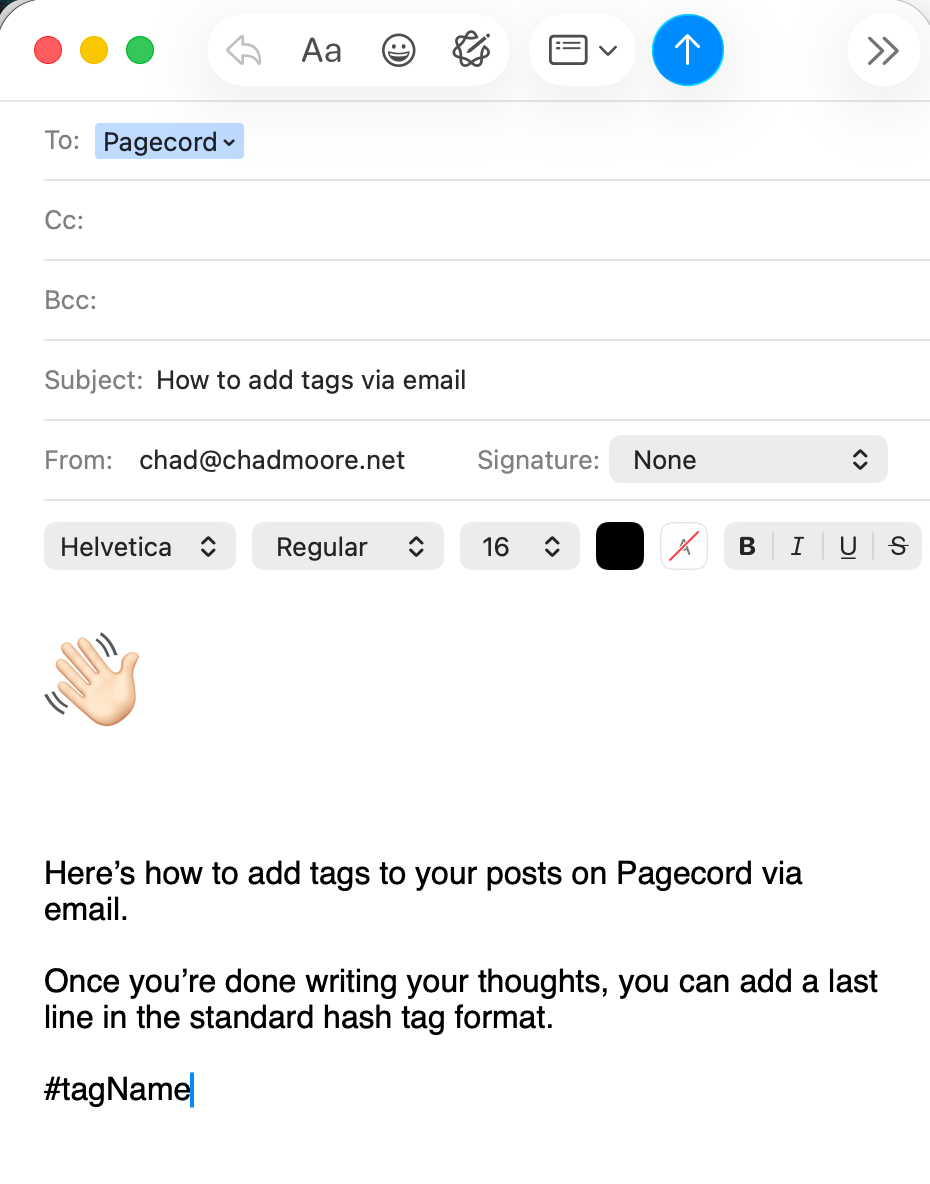
In Pagecord, tag each post with the appropriate tag name. The CSS will automatically apply the correct card color and post title color based on the tag.
When sending a post to your pagecord by email, adding a tag(s) is easy.
Notes and limitations
- Card rotation repeats after 20 posts. There is no random function in CSS. At least I couldn't figure one out.
- Posts with no matching tag will use the default card color.
- Tag colors on the bio stickies are matched by
hrefattribute, so the tag name in your URL must match exactly what you use in the CSS selector.